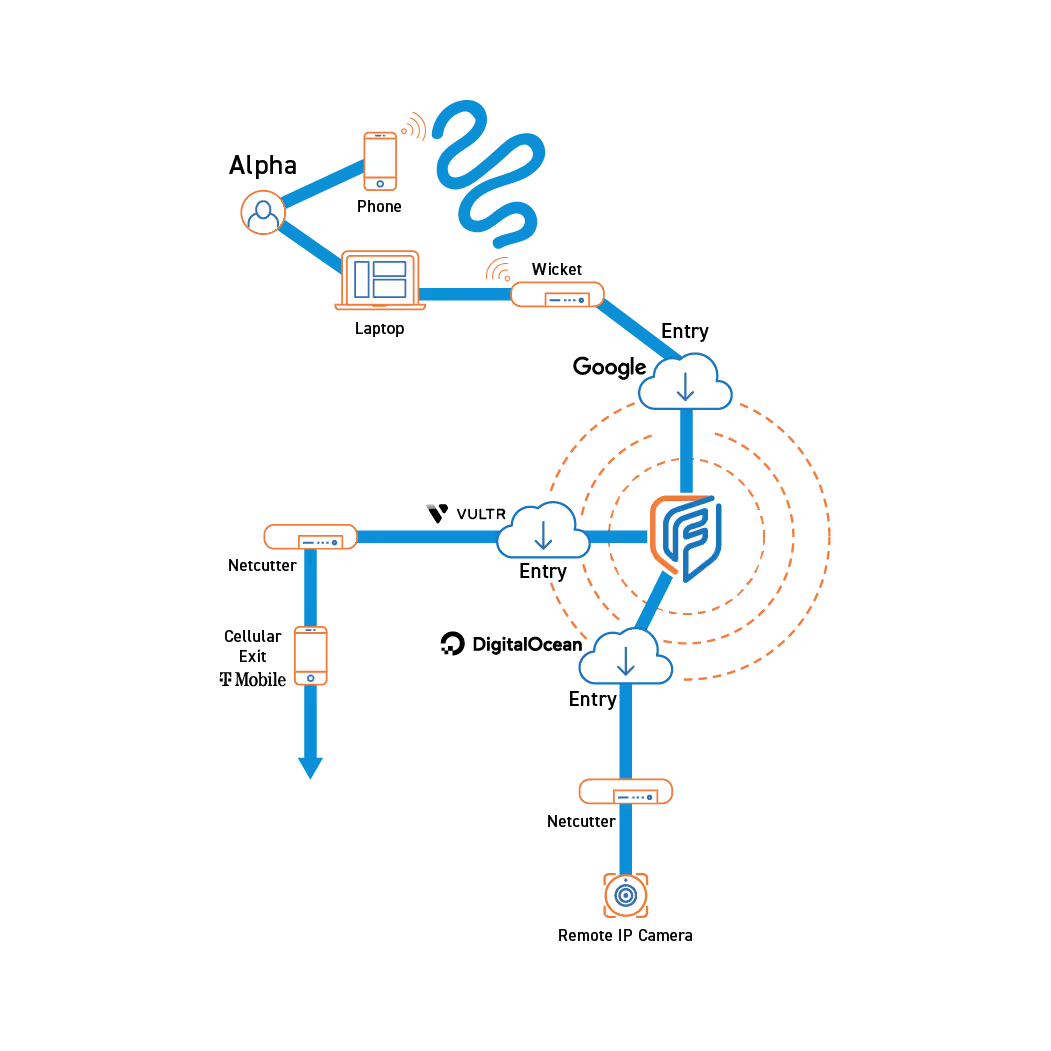
A Netcutter is a hardware device that generates an exit traffic node based on its location and allows users to access LAN devices remotely.

Placing a Netcutter on a localized network allows users to access LAN devices (IoT, security cameras, printers, etc.) remotely.

Netcutters can cause traffic to appear to originate from regions where there are no data centers available, providing additional exit points for managed attribution.

Logs or other data can be forwarded to another location through a Fognigma network by using a Netcutter.

Using a cellphone hotspot for a Netcutter’s internet connection allows Fognigma users to leverage cellular managed attribution points.
Fognigma’s Netcutter capability empowers organizations to take full control of how users can remotely connect to internal resources by enabling secure remote LAN access while also letting you create your own customizable exit points anywhere in the world.
Instead of relying on exposed corporate gateways or third-party VPNs endpoints, Netcutters allows you to build disposable misattributable pathways that drop users directly into a LAN with zero digital footprint. This can be used to securely access resources like live CCTV feeds, or even remote equipment and machinery saving time and money by unnecessarily sending personnel out to resolve a problem that can be handled promptly from a remote location.
Fognigma’s Netcutter is the perfect solution for protecting your personnel, assets and company data while still giving users the ability to securely access local resources remotely.
Fognigma's Netcutter solution is a hardware device that creates an exit traffic point within a Fognigma network. When a Netcutter is also connected to a LAN, users anywhere in the world with access to the Netcutter's Fognigma network can connect to the Netcutter's exit point and gain access to the LAN and any localized devices on it.
Once connected, the users' connections will appear to be generating from the location of the Netcutter, allowing them to remotely monitor LAN devices like security cameras. Traffic from the Netcutter will appear to be generating from headquarters.
Military commands, joint task forces, and government agencies rely on secure remote access solutions to monitor and manage private LAN resources, IoT devices, and network infrastructure from dispersed or forward locations without compromising operational security. Fognigma’s Netcutter is a pocket-sized hardware device that operates entirely within invisible, self-owned Mission Partner Environments, generating a location-based exit traffic node that allows authorized users to access LAN devices (security cameras, printers, sensors, drones, etc.) remotely while simultaneously creating global Exit Points for managed attribution.
By deploying a Netcutter on a local network (e.g., a hotel, café, or forward site), users can make all their traffic appear to originate from that Netcutter’s physical IP address. Conversely, placing a Netcutter within an organization’s network allows traveling personnel to present the appearance of operating from their home facility while working from any remote location.
Additionally, a cellular-enabled Netcutter internet connection further allows Fognigma users to leverage cellular managed-attribution points. Netcutters are plug-and-play, providing military and government organizations with a ready-to-deploy remote access solution that strengthens asset monitoring, enables flexible connectivity, and manages an organization’s digital footprint.


Join thousands trusting Fognigma’s zero-trust networks for invisible, encrypted communication anywhere, anytime.